Coach Bridges' Science Class - Contact and Online Access Information
To contact me, you can:
- Call the school at 601.833.7549;
- Email me at [email protected]
- or join my Remind app by texting the codes below to 81010 (choose the code for your scheduled class):
1st Period: @27bgb96
3rd Period: @cb3rd2526
4th Period: @cb4th2526
5th Period: @5thcoachb
6th Period: @6thcoachbr
My class information and assignments will be presented to students in 3 ways:
1) Canvas: This will be our main learning management system. The district is currently creating student access usernames and passwords. Please visit the Brookhaven School District Website (www.brookhavenschools.org) and the Alexander Junior High School Website (www.ajh.brookhavenschools.org) for the latest information.
2) Google Classroom: This will be the secondary site if you have problems with Canvas or need another option. Students should recognize how to use the program form last year. If not, go to the Brookhaven School District Website and click the Google Classroom icon:
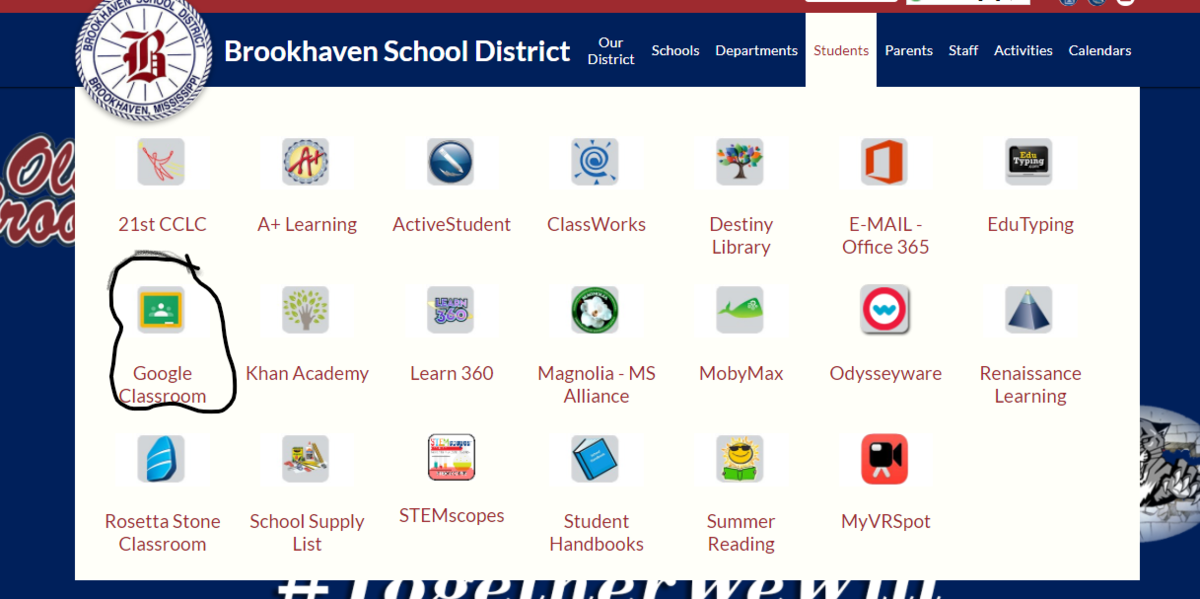
Then click the (+) sign in the upper righthand corner of the screen to Join a Class:
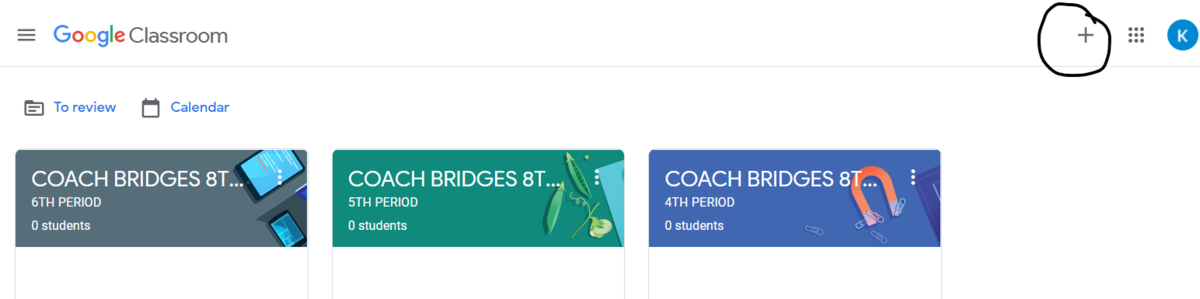
And enter the code for your scheduled class:
1st Period: jlxmo7xm
3rd Period: 3vrlvhya
4th Period: kacbzeql
5th Period: e2sliabb
6th Period: fx24gott
3) Remind App: All classroom news, assignments, and test details will be announced through the Remind app. Students can also download and send files and assignments as well as message. It will be a backup option.
If you are an at-home learner and do not know your class schedule, please contact the school for information or access to Active Parent. You can also contact me if you have any questions.
Let's have a great year and we will be STRONGER TOGETHER!!!!!! ##StrongerTogetherStrongerTogether